Free Shipping Nationwide. 1-2 Day Delivery.




800-372-5090
Customer Service M-F, 8:30 am - 7 pm EST
Primatech Technical Notes
Select the tab with the note you wish to review:
- Understanding & troubleshooting LoadXtend staple magazine (08/15)
- Replacement Pusher for the P-153 Stapler Magazine
Understanding & troubleshooting LoadXtend staple magazine
Here are instructions that will help you understand how the LoadXtend magazine works and whether it magazine works correctly.
Basic principles behind the LoadXtend magazines are that they are gravity fed when filled with several strips of staples, but operate in a conventional way with a spring loaded pusher when fewer than one strip remains. This is achieved with its exclusive pusher locks in a pre-armed position. Mains features of LoadXtend are:
- allowing strips to go over the pusher, extending the capacity of the magazine to 4 strips in an assembly no longer than a conventional one; and up to 6 strips in the Elbow configuration.
- quick loading - simply insert strips and arm the pusher.
- allowing to reload the magazine at any time, even if still half-full.
- cannot be overloaded
Loading LoadXtend magazine with flooring staples
- Insert up to 3 strips of flooring staples into the back of the magazine.
- Pull the pusher back completely and release it until it locks in position. It will not lock in its pre-armed position if fewer than 3" of staples, but it will engages behind the strip as a conventional magazine.
- After, you can add a 4th strip of staples after the pusher is lock, albeit it will slightly overhang from the magazine.
- To remove staples from the magazine, pull back completely & hold the pusher; and tilt the tool to slide back remaining staples.
Troubleshooting the LoadXtend magazine
- Put two rows of staples in the magazine.
- Pull the pusher back completely and release it until it locks in its pre-armed position. You should hear a "click" when it's locking.
- Check that all strips of staples slide easily in the magazine. It is important because they are fed by gravity until the pusher disengages from its pre-armed position. A pusher that is not locked correctly could restrict staples.
- With the two rows of staples in the magazine and the pusher in its locked in its pre-armed position, apply slight pressure downward the pusher. It should remain in its lock position.
- With the tool in its standing position, remove all strips but one. If the pusher disengages from its pre-armed position, the magazine is operationg correctly.
- If the pusher stays engaged, kick the magazine with the rubber end of the hammer to simulate vibration the tools is subjected to during normal cycle. This should disengage the pusher from its pre-armed position.
If your magazine failed one of the tests, contact our technical support team at (800) 363-1962 or support@primatech.ca.
Replacement pusher for P-153 stapler magazine
Pushers P-045A or P-045B as illustrated found on the older stapler magazine P-153 are no longer available.
Replacement of the pusher requires an upgrade to the new magazine:
- for P220 & P260 staplers, order P-153R magazine upgrade with P-139R gate upgrade
- for P245S staplers, order P-253S replacement magazine with P-639A gate upgrade
- for P245C nailer/staplers, order P-253C magazine upgrade with P-639B gate upgrade
- for P250A & P250F staplers, order P-253U magazine upgrade kit
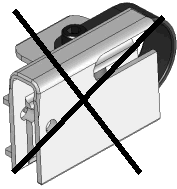
Pusher P-045A
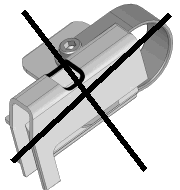
Pusher P-045B